

An LED controller sits between the driver and the LED strip and sets its brightness, colour or effects. Choose one by matching three things: the strip type (single colour, tunable white, RGB, RGBW or digital pixel), the voltage (12V, 24V or 48V) and the current each channel can carry.
This guide explains dimmers, RGB, DMX and smart control in plain terms. ATOM product specs were checked on 20 November 2026. Wiring on the mains side is a job for a qualified electrician.
Key takeaways
- An LED controller changes the strip's brightness, colour or effects. The driver powers the strip.
- Match the strip type first, because it sets how many channels the controller needs.
- Strip, driver and controller must share one voltage.
- Strip length per controller = controller watts at your voltage, minus 20 percent, divided by the strip's watts per metre.
- A normal mains dimmer cannot dim standard 12V or 24V strip. Use a PWM dimmer after the driver, or a dimmable driver with a matching mains dimmer.
- DMX suits large professional installs. Plain 12V or 24V strip also needs a DMX decoder and a DMX master.
In this guide
What is an LED controller?
An LED controller is a small unit that sits between the driver and the strip and sets brightness, colour and effects for homeowners and installers. It takes a command from a remote, wall panel, app or smart-home hub. It then switches the strip's power on and off very fast to dim it, a method called PWM.
The driver turns mains power into low-voltagelow-voltage DC. A strip that only switches on and off needs no controller. Dimming at the strip, or any colour change, does.

In short: the driver powers the strip, and the controller decides how it looks.
Which controller matches your strip type?
Match the LED controller's channel count to the strip type. A single colour strip needs one channel, tunable white needs two, RGB needs three, RGBW needs four and RGB plus tunable white needs five. A digital pixel strip needs a pixel controller that suits its chip. The voltage must also match the strip and the driver.
| Strip type | Channels needed | Usual wires | Notes |
|---|---|---|---|
| Single colour | 1 | 2 | One white shade, dimmed up and down |
| Tunable white (CCT) | 2 | 3 | Mixes warm and cool white |
| RGB | 3 | 4 | Shared positive plus one wire per colour |
| RGBW | 4 | 5 | RGB plus a white chip |
| RGB plus tunable white | 5 | 6 | Often sold as a 5-in-1 controller |
| Digital pixel (SPI) | Data line | Data plus power | Each pixel can be addressed on its own |
Wire counts are typical, so follow the wiring diagram for your own strip. The parts box below lists ATOM controllers for the most common strip types.
LED controllers to start with (prices inc. VAT, checked 20 November 2026)
- Single colour: Single colour 1-channel WiFi and RF controller. 5V to 24V DC, 5A, so 60W at 12V or 120W at 24V. App and 2.4GHz RF remote, IP20. £23.45.
- RGB: ATOM LED 3-channel RGB strip controller with touch remote. 12V or 24V, 6A per channel, 18A in total, IP40. £28.85.
- RGBW and RGB plus tunable white: Miboxer E3-RF RF controller. 12V or 24V, 6A per channel, 12A in total, 2.4GHz RF remote, IP20. £29.80.
- Smart home: GLEDOPTO Zigbee Pro Plus 5-in-1 controller, GL-C-201P. Zigbee 3.0, runs on 12V or 24V, IP20. £31.94.
Drivers are sold separately. Match the voltage and allow 20 to 25 percent spare capacity.
Which LED tape light dimmer do you need?
You need either a low-voltage PWM dimmer between the driver and the strip, or a dimmable driver with a compatible mains dimmer on the wall. A normal mains dimmer on its own cannot dim a standard 12V or 24V strip. Choose the method first, then buy the matching parts.
- PWM dimmer after the driver: This is the most common choice. It suits a single colour strip and comes as a push-dim unit, RF remote, wall panel, or app control. A 5A model handles 120W at 24V or 60W at 12V.
- Mains dimmer before a dimmable driver: The wall dimmer controls a driver built to be dimmed. The dimmer type, leading or trailing edge, and its minimum and maximum load must suit the driver's datasheet.
- Which to choose: one run under a cabinet suits a PWM dimmer. One wall dial for several lights suits dimmable drivers and a matching mains dimmer.
Safety: mains dimmer wiring is electrical work, so ask a qualified electrician. A new circuit in England and Wales needs Part P notification.
In short: dim on the low-voltage side for simplicity, or on the mains side with a matched driver.
What does an RGB controller do?
A controller for RGB strip mixes red, green and blue light by setting each colour channel's brightness separately, so one strip can show almost any colour. RGBW adds a fourth channel for white, and RGB plus tunable white adds a fifth. A remote, app or wall panel picks the colour and effect.
- Channels and current: each colour channel has its own current limit. The ATOM 3-channel unit in the parts box lists 6A per channel and 18A in total.
- Common anode: the strip has one shared positive wire plus one wire per colour, so the strip and controller types must match.
- Single colour strip on a multi-channel unit: only the channels you connect carry the load, so the per-channel rating sets your limit, not the total.
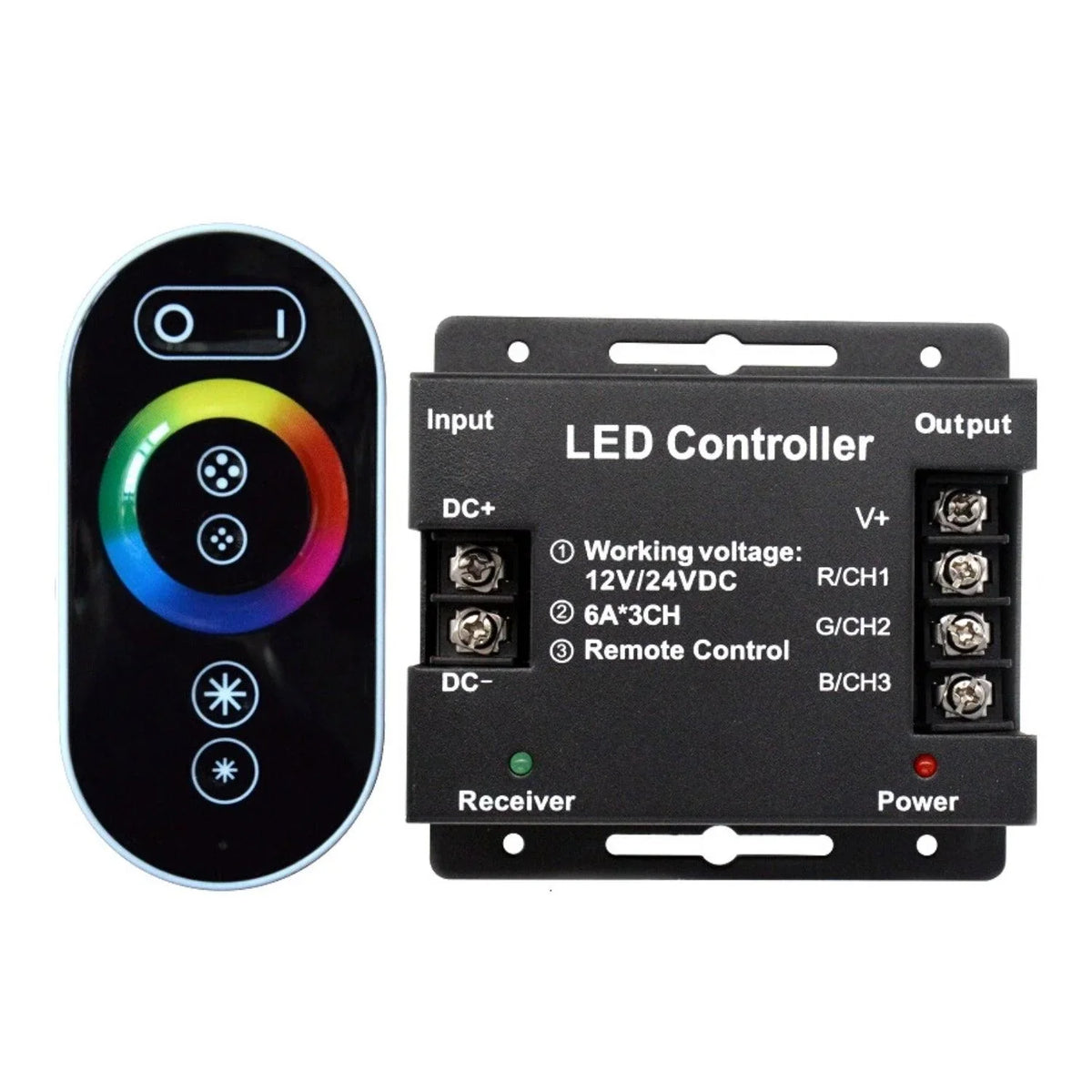
In short: count the colour channels your strip has, then check the amps on each one.
Do you need a DMX controller for LED strip?
Only for large or professional installs. DMX512 is a digital control standard that carries 512 channels per universe. A plain 12V or 24V strip cannot read it, so a DMX decoder must convert the signal, and a DMX master or console must send it. A home kitchen or bedroom rarely needs this.
- Channel maths: One RGB strip zone uses 3 channels, so one universe covers 170 zones (512 divided by 3). An RGBW zone uses 4 channels, so one universe covers 128.
- Decoder types: A decoder for a 12V or 24V strip turns DMX into PWM output. The digital pixel strip uses a DMX-to-SPI decoder instead.
- What ATOM lists: The DMX products ATOM lists are for digital pixel (SPI) strips, and some list DMX only as an output. For a DMX master, a console, or a decoder for a plain 12V or 24V strip, ask ATOM sales what is available, or use a specialist lighting supplier.
In short: skip DMX for a home project. Use it when many zones must follow one central control.
RF, WiFi or Zigbee: which control method suits you?
Use an RF remote for simple room control, WiFi for app and voice control, and Zigbee for a larger smart-home system with a hub. Wall panels and push-dimmers suit fixed positions. Range and setup differ by model, so read the product page before you buy.
- IR remote: needs a clear line of sight, so it suits one room.
- RF remote: works through furniture and thin walls better than IR. ATOM's product pages list 20m to 30m range in open space. Walls and metal cut that range.
- WiFi: gives app control and schedules. Check whether voice control is built in or needs a separate gateway, because product pages differ.
- Zigbee: joins a Zigbee hub, which suits homes with many controllers in one system.
- Wall panel or push-dim: no phone is needed, so it suits fixed positions.

In short: pick RF for simplicity, WiFi for the phone, and Zigbee when lighting joins a wider smart-home system.
Miboxer, Skydance or GLEDOPTO: how do they differ?
Each maker's LED controller range covers different needs. Miboxer offers a wide mix of RF, WiFi and Zigbee controllers. Skydance includes push-dim controllers, models up to 48V and mains panel dimmers. GLEDOPTO focuses on Zigbee and WiFi smart models, plus pixel controllers. Check the voltage range on each product page.
All three work, so choose by control method and by the amps your strip needs. The parts box and the shop table show examples.
How many metres of strip can one controller run?
Divide the LED controller's maximum watts at your voltage by the strip's watts per metre, after keeping 20 percent in hand. Then check the strip's own maximum run. The lower of the two figures is your limit for each controller output.
Watts are equal to volts multiplied by amps. A 5A controller therefore carries 60W at 12V but 120W at 24V.
Worked example, single colour: a 5A controller at 24V gives 120W. Keep 20 percent in hand: 120 × 0.8 = 96W. ATOM's 24V COB strip uses 9W per metre (product page, checked 18 November 2026), so 96 ÷ 9 = 10.7m. Plan for about 10m. That strip lists a 15m maximum run, so the controller is the limit here.
Larger controller: a 15A single colour push-dim model lists 360W at 24V, and 360 × 0.8 ÷ 9 = 32m. Each strip piece still stops at its own 15m maximum run, so wire several shorter runs in parallel.
Worked example, RGB (example figures only): take a 24V RGB strip rated 14.4W per metre. A 5m piece draws 72W in total, or 24W on each colour channel (72 ÷ 3). That sits far inside a 6A channel, which carries 144W at 24V.
Size the driver next. Add the strip's total watts, then 20 to 25 percent spare capacity. For 10m of the 9W strip that is 90W × 1.25 = 112.5W, so choose the next driver size up.
Long runs lose brightness at the far end, and 12V strip often reaches only about 5m from one feed. ATOM's voltage guide compares 12V, 24V and 48V. ATOM cuts strip to your measurements, and the custom projects page covers layouts with several runs.
In short: check the controller's watts, the strip's maximum run and the driver, in that order.
How do you choose an LED controller in five steps?
Work through five checks in this order: strip type, voltage, channel current, control method, then wiring. Each check removes options, so you finish with a short list. Doing them in order avoids buying the remote you like before checking that it suits the strip.
- Read the strip's product page for its type, such as single colour, tunable white, RGB or digital pixel. The wire count helps confirm it.
- Note the strip voltage and choose a driver and a controller at the same voltage.
- Add up the strip's watts, then compare them with the controller's amps per channel and its total watts at that voltage.
- Choose the control method: push-dim, wall panel, RF remote, WiFi app or Zigbee hub.
- Wire the controller between the driver and the strip, following ATOM's wiring guides, and test before you fix anything in place. Isolate the power first.
What mistakes cause most controller problems?
The common faults are mismatched voltage, an overloaded channel, the wrong channel count and a mains dimmer on a driver that cannot be dimmed. All are cheap to avoid if you check the specs before you buy. Each is listed below with its fix.
- Mismatched voltage: a 12V strip on a 24V driver, or the reverse. Match the strip, driver and controller.
- Overloaded channel: the strip draws more than one channel can carry. Check amps per channel, not only the total.
- Wrong channel count: a three-channel unit on tunable white strip, or a single channel unit on RGB strip.
- Dimming a non-dimmable driver: a mains dimmer ahead of a driver that is not built for it can cause flicker or poor dimming. Check the driver's datasheet.
- Mixing mains and low-voltage parts: strip for 220V to 240V needs mains-rated controllers only, and low-voltage controllers must never go on mains.
Shop the parts
These links cover jobs that the parts box above does not. Pick the row that matches your project, then check voltage, channels and amps on the live product page before you order. Prices change, so confirm them at checkout. Each link opens a live ATOM page.
| Your job | Part type | Where to look |
|---|---|---|
| Push-dim or remote for one single colour strip | Push-dim controller, 12V to 48V | Push-dim single colour controller |
| Zigbee smart-home lighting | Zigbee and WiFi smart controllers | GLEDOPTO controllers |
| Remote control for single colour, tunable white, RGB and RGBW strip | RF, WiFi and Zigbee controllers | Miboxer controllers |
| Wall panels, push-dim and mains panel dimmers | Panel and push-dim controllers | Skydance controllers |
| Digital pixel strip and DMX | Pixel (SPI) controllers | Digital pixel controllers |
FAQs
What is the difference between a controller and a driver?
A driver converts mains power into the low voltage DC that the strip needs, such as 12V or 24V. A controller sits after the driver and changes the strip's brightness, colour or effects. Most dimming and colour setups need both.
Can I use a normal dimmer switch on LED strip lights?
Not on its own. Standard 12V and 24V strip runs from a driver, so a mains dimmer only works if the driver is built to be dimmed and suits the dimmer type. Otherwise add a PWM dimmer between the driver and the strip.
Do I need a DMX decoder for LED strip?
Yes, for plain 12V or 24V strip. The decoder converts the DMX signal into PWM output that the strip understands, and a DMX master or console must supply the signal. Digital pixel strip uses a DMX-to-SPI decoder instead.
Why is my LED strip remote not working?
Check the basics in order: power at the driver, the remote's battery, range and line of sight, then pairing. Follow the pairing steps on the product page, because they differ by model.
Need help choosing a controller?
Call 01952 370028 or email sales@atomled.co.uk.
Monday to Friday, 9am to 5pm.
Start with the strip type and voltage, then check the amps before you pick the remote or app for your LED controller. If your layout has several zones or an unusual strip, send ATOM your plan and the team can confirm the parts.